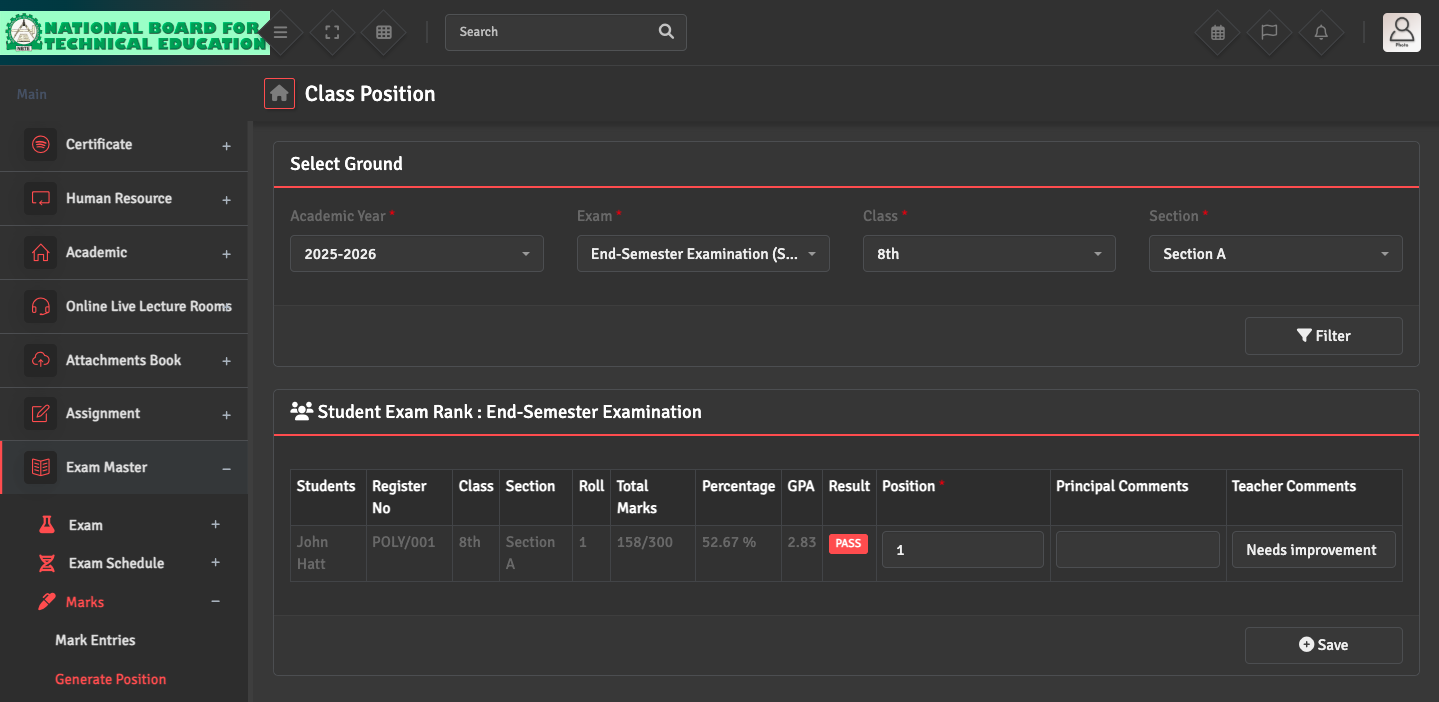
Student Ranking / Position Issue

To calculate class rankings, navigate to Exam Master→ Marks → Generate Positions. The system calculates positions based on the total marks or GPA across all subjects in a term.

If ranks are missing, ensure that marks for all subjects in that exam term have been entered and that the 'Result Status' has been set to 'Pass' for the affected students.

Did you find this article useful?

  • Exam Attendance Issue

    To record or update attendance for a specific exam, please navigate to Attendance → Exam...
  • Marks Entry Issue

    Mark entry may be restricted if the exam configuration is incomplete. Please ensure the exam has a...
  • Marks Correction

    To correct a student's marks after saving, go to Exam Master → Marks → Marks Entri...
  • Grade / GPA Calculation Issue

    If grades are calculated incorrectly, please check your settings under  Exam Master→ Mar...
  • Result Publishing Issue

    If parents cannot see results, please go to Exam Master → Exam → Exam Setup and e...