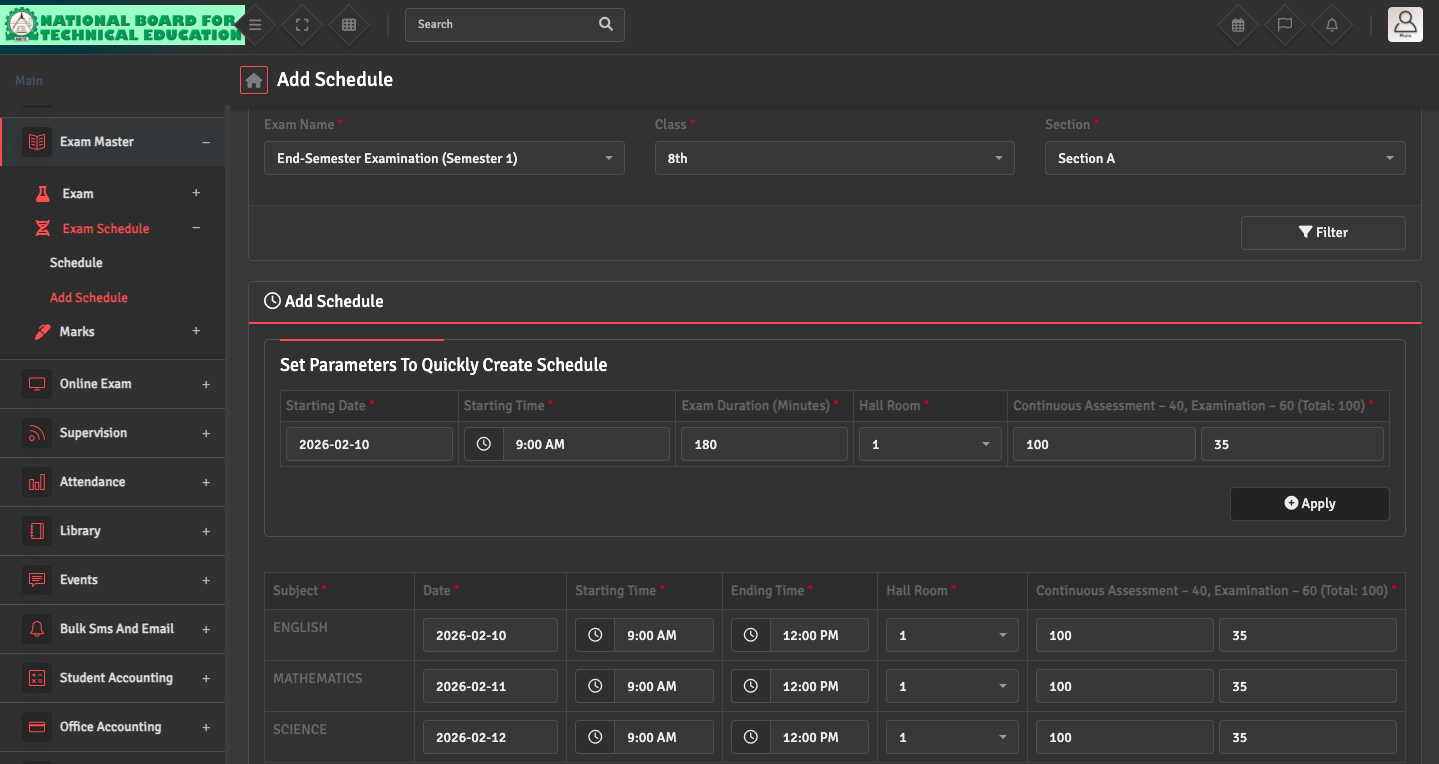
Exam Schedule Setup

To define your date sheet, navigate to Exam Master →  Exam Schedule → Add Schedule. Select the Exam and Class to assign dates, start times, durations, and room numbers for each subject.

Once saved, the schedule will be visible to students and parents via their respective portals.

Did you find this article useful?

  • Exam Term Creation

    To organize your academic year into testing periods, please navigate to Exam Master → Ex...
  • Exam Hall Setup

    To manage physical seating arrangements, go to Exam Master → Exam → Exam Hall. You...
  • Mark Distribution Setup

    To define how a subject is graded, navigate to Exam Master → Exam → Distribution. ...
  • Exam Creation

    To set up a new assessment, go to Exam→ Exam Setup → Create Exam. Link the exam to...
  • Online Exam Setup

    To create an online exam, navigate to Online Exam → Online Exam → Add Online Exam....