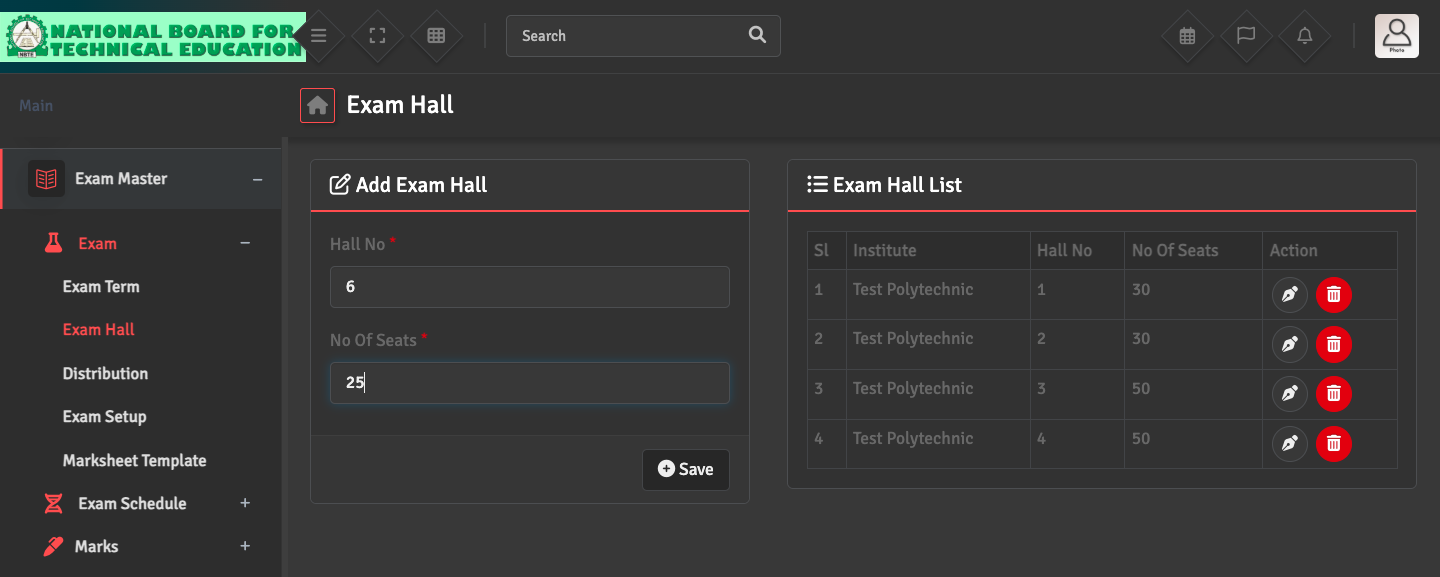
Exam Hall Setup

To manage physical seating arrangements, go to Exam Master → Exam → Exam Hall. You can enter the hall number and specify their total seating capacity.

This information is required if you plan to use the system to generate automated seating plans and hall tickets.

Did you find this article useful?

  • Exam Term Creation

    To organize your academic year into testing periods, please navigate to Exam Master → Ex...
  • Mark Distribution Setup

    To define how a subject is graded, navigate to Exam Master → Exam → Distribution. ...
  • Exam Creation

    To set up a new assessment, go to Exam→ Exam Setup → Create Exam. Link the exam to...
  • Exam Schedule Setup

    To define your date sheet, navigate to Exam Master →  Exam Schedule → Add Schedule...
  • Online Exam Setup

    To create an online exam, navigate to Online Exam → Online Exam → Add Online Exam....